2027 ComplianceUAE e-invoicing goes live 1 Jan 2027 · ZATCA Wave 25 due 1 Feb 2027 · FBR digital invoicing in forceGet a free readiness check
WebDesk Account and Trading

Trading Software in UAE for Sales, Purchase and Stock Management

Looking for the best trading software company in Dubai? ICT Information Systems LLC builds WebDesk, trading software in UAE that connects quotations, sales and purchase orders, stock control, invoicing and VAT reports in one cloud system. WebDesk manages business stock and inventory. It is not a brokerage platform for buying or selling shares.

Get started with one of the best trading software solutions in Dubai.

Cloud & mobileVAT-readyGCC · PakistanEnglish / Arabic

We offer Account & Trading Software in Dubai

Get a free demo and quote — reply within one working day.

Please enter your name
Enter a valid email
Enter a valid phone number
Thank you! Our team will contact you shortly.
Overview

WebDesk ERP Trading Software for UAE Businesses

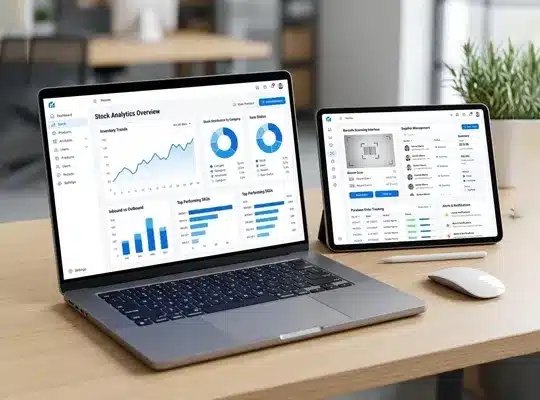
Run your trading business with less hassle. WebDesk Trading Software connects sales, purchases, stock, orders, invoicing, warehousing, and deliveries in one place. Built for UAE businesses, it keeps daily work organized and gives your team better control over every transaction. Explore each module to see the features, workflows, and reports before getting started.

Streamline Trading Operations With a Connected ERP Platform

WebDesk ERP connects sales, purchases, inventory, quotations, orders, warehousing, invoicing, delivery, and reporting. This gives businesses a more organized way to manage daily commercial trading activities from one system.

Businesses searching for software for stock market UAE should first identify their actual software requirement. WebDesk is designed for commercial trading businesses that sell and purchase physical products, manage inventory, process orders, and handle warehouses and invoices. It is not a securities trading platform for buying or selling financial-market shares.

Searching for software for stock market UAE? If you mean warehouse stock, WebDesk fits. It manages your products, purchase orders and invoices. It does not trade shares.

Looking for trading stock market software in Dubai? WebDesk gives you stock control, purchase workflows and sales workflows in one cloud system.

Need affordable stock trading UAE solutions? Start with the modules you need and add more as you grow. WebDesk suits wholesalers, distributors, retailers, importers and exporters.

A Practical ERP Trading Solution for UAE Businesses

UAE traders handle products, suppliers, customer orders, warehouses and multiple locations every day. A connected ERP keeps all of it in one place, so sales, purchases, stock and deliveries stay easy to track.

Comparing cheap stock trading software? WebDesk replaces spreadsheets and separate tools with one system.

A practical ERP trading solution for UAE businesses

Invest in a Structured Trading Management System

The WebDesk Trading Module adds barcode tracking, multi-warehouse management, reporting and links to other WebDesk modules. You get structured control over your products and stock.

WebDesk trading software for stocks tracks stock levels, stock movements, sales and purchases across every warehouse and branch.

Invest in a structured trading management system

Why WebDesk Trading Software Fits UAE Business Requirements

ICT Information Systems LLC develops WebDesk ERP to connect your sales, purchases, inventory, warehousing, orders and accounting. Your team enters data once and sees every transaction clearly.

Searching for the best stock market WebDesk software? WebDesk manages your goods: stock levels, purchase orders, sales orders and invoices.

Comparing the best stock software in UAE? WebDesk tracks stock across warehouses, supports barcodes and links to your invoicing, reports and other modules.

Need stock market software Dubai traders can use for goods? WebDesk covers the stock side of your business.

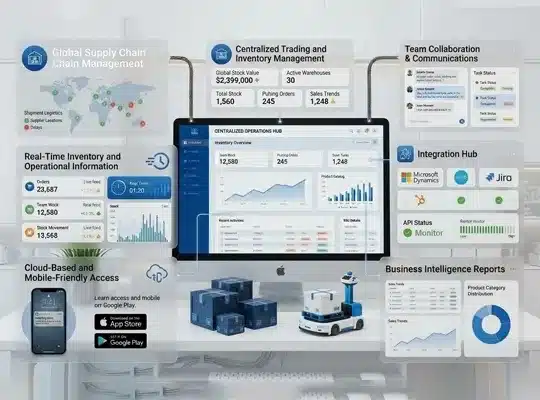
Leading Advantages of Robust ERP Systems for Trading

  • Centralized trading and inventory management
  • Cloud-based and mobile-friendly access
  • Integration with existing business systems
  • Real-time inventory and operational information
  • Business reports for better visibility
Leading advantages

What Are the Major Challenges in the Trading Industry?

Trading businesses can face problems when sales, purchases, inventory, warehouses, and orders are handled separately. Common issues include inaccurate stock records, delayed updates, limited reporting, and disconnected branch information. A centralized ERP system helps keep these activities organized and connected.

Poor Inventory Visibility icon

Poor Inventory Visibility

Inconsistent stock records can lead to shortages, excess inventory, and slower warehouse operations. Centralized inventory tracking gives teams clearer information about stock levels and product movements.

Limited Real-Time Business Data icon

Limited Real-Time Business Data

Managers need current information about sales, purchases, orders, and inventory. Connected dashboards and reports make important business information easier to review and support day-to-day decisions.

Multi-Branch Inventory Management icon

Multi-Branch Inventory Management

Managing stock across different branches and warehouses requires consistent records. A centralized system helps teams monitor inventory, orders, and related transactions across multiple locations.

Crucial Features of Our Leading ERP Trading Solution

WebDesk brings key commercial trading activities into one connected platform, helping businesses manage sales, purchases, products, inventory, orders, warehouses, and reports with greater consistency.

One Platform for Complete Trading Operations icon

One Platform for Complete Trading Operations

Manage sales, purchases, quotations, orders, inventory, warehousing, invoicing, and deliveries through one connected system.

Inventory and Order Management icon

Inventory and Order Management

Track purchase orders, sales orders, stock movements, and product availability through organized transaction workflows.

Real-Time Business Information icon

Real-Time Business Information

Access updated information about sales, purchases, inventory, warehouse activity, and customer orders from connected business records.

Business Reports for Better Visibility icon

Business Reports for Better Visibility

Review sales, purchases, inventory, stock movements, and other operational records through centralized reports.

Additional Trading ERP Benefits and Features

Multi-Warehouse and Multi-Location Management

Manage inventory across multiple warehouses, branches, and business locations while keeping records connected.

Real-Time Inventory Tracking

Monitor stock levels, product movements, sales, purchases, and warehouse availability through updated inventory records.

Connected ERP Integration

Connect trading operations with Accounting, CRM, Payroll, HRMS, and POS modules within the WebDesk environment.

Order and Purchase Workflow Management

Manage quotations, sales orders, purchase orders, deliveries, and invoices through connected transaction workflows.

Business Dashboards and Reports

Review sales, purchases, customer orders, inventory, and other business activities through dashboards and reports.

WebDesk ERP 4.0 Trading (Key Features)

General

  • Company Configuration
  • Business Unit
  • Designation
  • Dashboard Access
  • Terms and Conditions
  • Search Ref Document
  • Zone Master

Setting

  • Currency Setup

Setup

  • Countries
  • City Master
  • Email Configuration
  • State

Product Setup

  • Brand Master
  • Category
  • Product Master
  • Product Unit
  • All Product List

Accounts Master

  • Financial Year Master
  • Chart of Account
  • Currency Master
  • Bank Master
  • Supplier
  • Customer
  • Tax and Discount Group
  • Tax and Discount Master
  • Cost Center
  • Account Reconciliation
  • Account Setup Form
  • Transaction Locking

Voucher

  • Bank Payment Voucher
  • Cash Payment Voucher
  • Bank Receipt Voucher
  • Cash Receipt Voucher
  • Journal Voucher
  • Petty Cash Voucher
  • Inventory Expense

Inventory

  • Warehouse Master
  • Opening Stock
  • Stock Transfer
  • Inventory Adjustment

Purchase

  • Purchase Quotation
  • Purchase Order
  • Goods Received Note
  • Purchase Invoice
  • Purchase Return
  • Debit Note

Sales

  • Sales Quotation
  • Sales Order
  • Delivery Note
  • Sales Invoice
  • Sales Return
  • Credit Note

Trading (Reports)

Business Overview

  • Profit / Loss Report
  • B/S Report
  • Trial Balance Report

Account Reports

  • Ledger Report
  • Customer Ledger New
  • Customer Ledger
  • Supplier Ledger
  • Customer Aging
  • Expense Sheet
  • Supplier Aging
  • Cost Center Sheet
  • Ageing Status Report
  • Post Dated Cheques
  • Cash Register Report
  • Account Ledger Report
  • Current Stock Report
  • Purchase Bill Report
  • Sales Bill Report
  • Stock With Value Report

Accounts Register and Book

  • Day Book
  • Cash Book
  • Bank Book
  • Purchase Register
  • Sales Register
  • Journal Register

Voucher Summary Reports

  • Bank Payment Voucher Summary
  • Cash Payment Voucher Summary
  • Bank Receipt Voucher Summary
  • Cash Receipt Voucher Summary
  • Journal Voucher Summary
  • Petty Cash Voucher Summary

Voucher Detail Reports

  • Bank Payment Voucher
  • Cash Payment Voucher
  • Bank Receipt Voucher
  • Cash Receipt Voucher
  • Journal Voucher
  • Petty Cash Voucher

Trade Summary Reports

  • Purchase Quotation Summary
  • Purchase Order Summary
  • Goods Received Notes Summary
  • Purchase Invoice Summary
  • Purchase Return Summary
  • Sales Quotation Summary
  • Sales Order Summary
  • Delivery Note Summary
  • Sales Invoice Summary
  • Sales Return Summary

Trade Detail Reports

  • Purchase Quotation
  • Purchase Order
  • Goods Received Notes
  • Purchase Invoice
  • Purchase Return
  • Sales Quotation
  • Sales Order
  • Delivery Note
  • Sales Invoice
  • Sales Return

Inventory Reports

  • Stock Valuation
  • Stock Item Cost Analysis
  • Batch Summary
  • Stock Ageing Analysis
  • Warehouse Summary
  • Stock Ledger Report
  • Opening Stock Report
  • Stock Transfer Report
  • Stock Movement Report
  • Negative Stock

Master Reports

  • Currency Master
  • Bank Master Report
  • Account Reconciliation Report
  • Chart of Account Master Report
  • Financial Year Master Report
  • Discount Tax Group Master Report
  • Discount Tax Master Report
  • Vendor Master Report
  • Designation Master Report
  • Relation Master Report
  • Loan Installment Master Report
  • Loan Master Report

VAT Reports

  • VAT Input and Output Report
  • VAT Input and Output Report New
  • Item Wise VAT
  • Invoice Group Wise VAT
Module folios

Forms and reports, folio by folio

Explore each folio to see the entry forms and reports your team will use every day.

Folio 01

Purchase Requisition and Quotation

Every purchase starts here — internal departments raise requisitions, procurement collects and compares supplier quotations before committing to an order.

Forms

  • Purchase Requisition Form
  • Request for Quotation (RFQ) Form
  • Purchase Quotation Comparison Form

Reports

  • Purchase Requisition Report
  • Purchase Quotation Report
See Purchase Requisition and Quotation in a demo
Folio 02

Purchase Order Management

Convert the winning quotation into a formal purchase order, route it through approval, and track it until goods arrive.

Forms

  • Purchase Order Entry Form
  • PO Approval Workflow Form
  • Vendor Selection Form

Reports

  • Purchase Order Report
  • Pending PO Report
See Purchase Order Management in a demo
Folio 03

Goods Received Note and Purchase Invoice

Match incoming stock against the purchase order, then post the supplier's invoice against the goods actually received — a three-way match by design.

Forms

  • Goods Received Note (GRN) Form
  • Purchase Invoice Entry Form
  • Purchase Invoice Matching Form

Reports

  • Goods Received Note Report
  • Purchase Invoice Report
  • Purchase Report
See Goods Received Note and Purchase Invoice in a demo
Folio 04

Purchase Return Management

Send defective or excess stock back to the supplier with a proper return document that flows straight into accounts payable as a debit note.

Forms

  • Purchase Return / Debit Note Form

Reports

  • Purchase Return Report
See Purchase Return Management in a demo
Folio 05

Sales Lead and Quotation Management

Capture every enquiry as a lead, qualify it, and send a formal quotation — the starting point of every sale WebDesk Trading tracks.

Forms

  • Sales Lead / Inquiry Entry Form
  • Sales Quotation Form

Reports

  • Sales Inquiry Report
  • Sales Quotation Report
See Sales Lead and Quotation Management in a demo
Folio 06

Sales Order and Proforma Invoice

Confirm the quotation into a sales order, and issue a proforma invoice where advance payment or LC terms apply before dispatch.

Forms

  • Sales Order Entry Form
  • Proforma Invoice Form

Reports

  • Sales Order Report
See Sales Order and Proforma Invoice in a demo
Folio 07

Delivery Note and Sales Invoice

Dispatch confirmed orders with a delivery note, then invoice the customer — with delivery dates and shipment status tracked automatically.

Forms

  • Delivery Note Form
  • Sales Invoice Entry Form

Reports

  • Delivery Note Report
  • Sales Invoice Report
  • Sales Report
See Delivery Note and Sales Invoice in a demo
Folio 08

Sales Return Management

Process customer returns cleanly with a credit note that adjusts receivables and restocks inventory in one step.

Forms

  • Sales Return / Credit Note Form

Reports

  • Sales Return Report
See Sales Return Management in a demo
Folio 09

Order Tracking and Shipment Management

Track every order from entry date to delivery, get ETAs on shipments, and receive alerts the moment an item goes back-ordered with the manufacturer.

Forms

  • Shipment Tracking Update Form
  • Backorder Alert Setup Form
  • ETA Configuration Form

Reports

  • Order Status Report
  • Backorder Report
See Order Tracking and Shipment Management in a demo
Folio 10

Trade Reporting and Analytics

Every purchase and sales transaction rolls up into stock and trade reports that give management a single view of trading performance.

Forms

  • Report Configuration Form

Reports

  • Stock Ledger Report
  • Product List Report
  • Opening Stock Report
  • Stock Movement Report
  • Stock Transfer Report
See Trade Reporting and Analytics in a demo
Centralized Trading Dashboard

Everything in One Trading Platform

Keep sales, products, stock movements, orders and business records connected in one trading dashboard.

  • Centralized Trading Dashboard
  • Complete Sales and Purchase Management
  • Real-Time Inventory Tracking
  • Multi-Warehouse Inventory Control
  • Quotation and Sales Order Management
  • Purchase Order and Supplier Management
  • Delivery and Dispatch Management
  • Barcode and Product Tracking
  • Advanced Business Reports — Web, Excel and PDF Export
  • Complete Multi-Branch Trading Management

Trading Made Easy with WebDesk ERP Trading Software

See how businesses in Dubai and across the UAE manage trading operations with WebDesk. Ready to buy stock trading software in UAE? Request a demo or contact our Dubai team to discuss your modules and users.

FAQ

Account & Trading Software — frequently asked questions

01Can Trading ERP Software integrate with existing business systems?

Yes. It can connect with accounting, CRM, payroll, POS, and other business systems to keep related information connected across operations.

02Can I customize the Trading ERP Software for my business?

Yes. The software can be adapted to your workflows, reports, trading processes, and specific business requirements.

03What support is available after implementation?

Support can include implementation assistance, user training, technical support, and ongoing maintenance.

04Who can use Trading ERP Software?

It is suitable for wholesalers, distributors, retailers, manufacturers, importers, exporters, and other businesses managing commercial trading activities.

05Is WebDesk stock market software?

WebDesk is stock and inventory software for UAE trading companies. It manages sales, purchases, warehouse stock, invoicing and VAT reports. It is not a brokerage or securities-trading platform. To trade shares on DFM or ADX, you need a licensed broker.

Next steps

See WebDesk running on your business

Book a guided demo with an ERP consultant, or talk to our team right now.

Book a Free Demo

Personalised demo · Free requirement analysis · Proposal within 24 hours

Please enter your name
Please enter your company
Enter a valid email
Enter a valid phone number

Your details stay private. No spam, ever.

Thank you! Your request has been prepared — our team will contact you shortly.

Chat with sales

Instant answers on WhatsApp, Monday – Friday, 9:00 – 18:00 GST.

Chat now

Call us