2027 ComplianceUAE e-invoicing goes live 1 Jan 2027 · ZATCA Wave 25 due 1 Feb 2027 · FBR digital invoicing in forceGet a free readiness check
WebDesk ERP Accounting Software

Accounting Software in UAE for Businesses That Want Clean Books

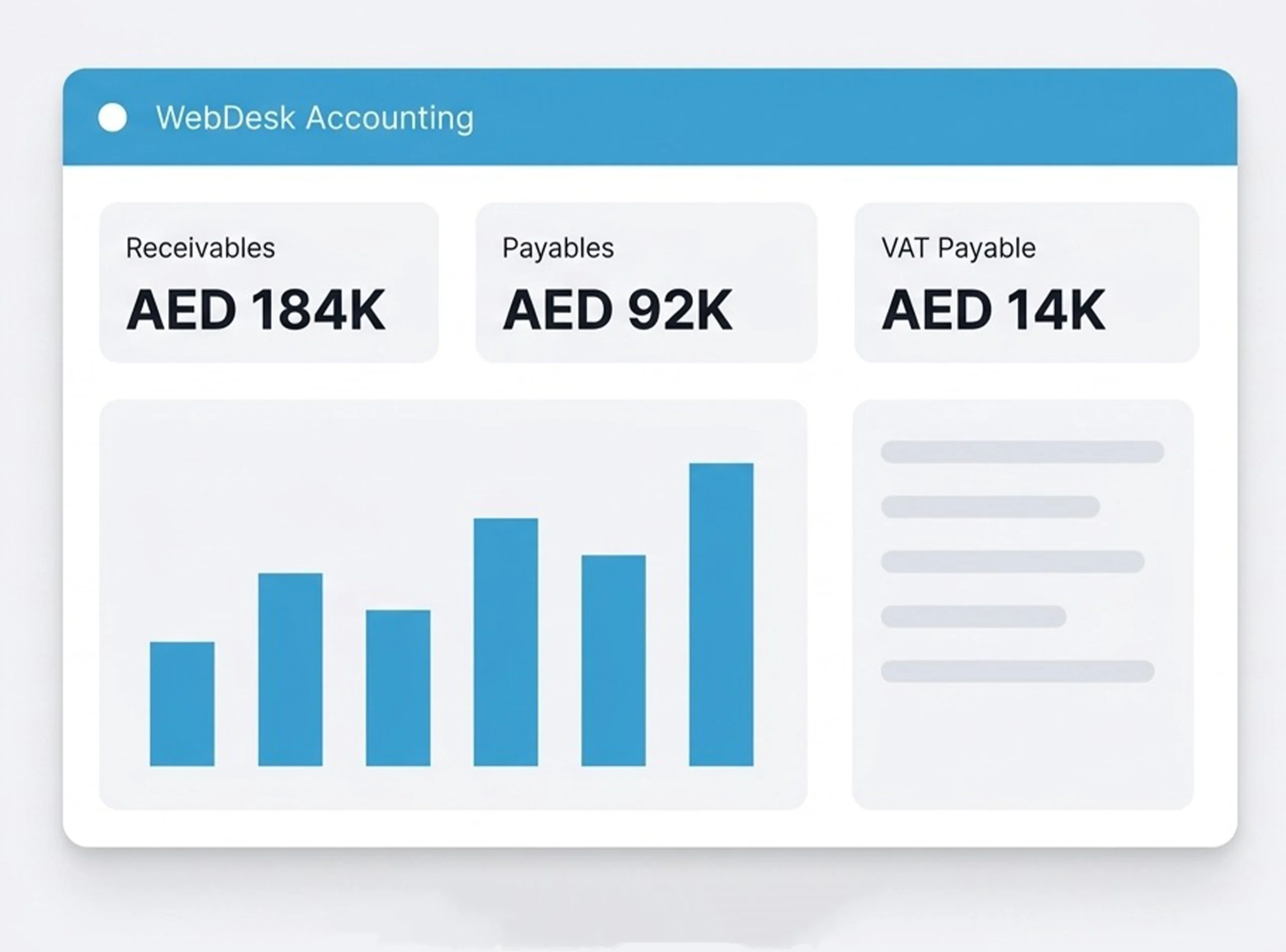
WebDesk ERP is accounting software in UAE that brings invoicing, bookkeeping, payables, receivables, banking, VAT, budgeting and reports into one system. If you are looking for the best accounting software in Dubai, this is where your daily finance work gets simple.

Cloud & mobileVAT-readyGCC · PakistanEnglish / Arabic

We offer Accounting Software in Dubai

Get a free demo and quote — reply within one working day.

Please enter your name
Enter a valid email
Enter a valid phone number
Thank you! Our team will contact you shortly.
Overview

One Ledger. Every Currency, Branch and Cost Centre

WebDesk gives your finance team one place for General Ledger, Accounts Payable, Accounts Receivable, Cash and Bank, Budgeting, Fixed Assets, Tax and Financial Reporting.

Built as accounting software in UAE companies can set up around their own workflow, it keeps transactions and related business records together, so your team can check books and track performance without jumping between tools.

10Accounting modules
VATInput and output reports
MultiBranch and currency
WebExcel and PDF export

Streamline Your Accounting Operations With Our ERP Software

WebDesk ERP, our accounting software in UAE, is made for teams tired of juggling spreadsheets. Your ledger sits next to your invoices and your bank entries and your reports. Everyone works from the same books.

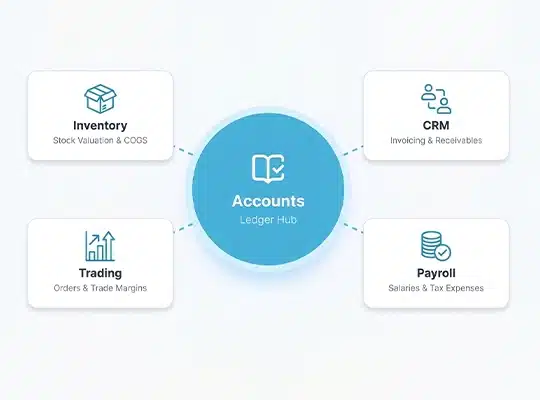
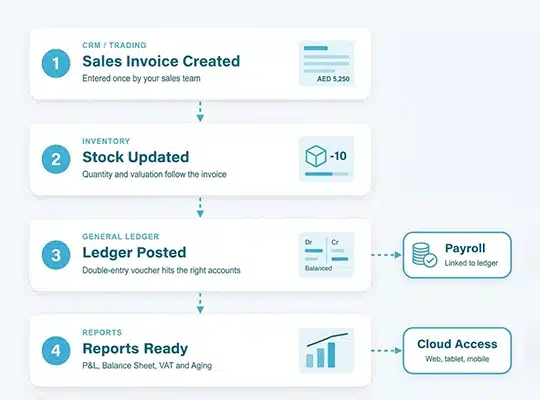
The setup follows your workflow whether you run a startup or a large group. Inventory and payroll and CRM feed straight into the accounts so the numbers match what happens in the business.

  • One ledger for every branch
  • Bank reconciliation with cheque tracking
  • VAT reports ready when you need them
  • Excel and PDF export in one click
Accounting Software Dubai

Accounting Software Built for Businesses Across the UAE

WebDesk ERP is made around how companies in the UAE actually keep their books. VAT accounting, tax and discount setup, invoicing, bookkeeping and financial reports are all part of the system.

Your team keeps clean transaction records and can pull them up any time for review, reconciliation and reporting.

If you are comparing online accounting tools, you get a connected system you can open from a browser, not a pile of manual files.

Accounting Software Built for Businesses UAE

ERP Accounting

A Practical ERP Accounting Solution for Dubai Businesses

As you add customers, suppliers, branches, products and staff, finance gets harder to keep tidy. WebDesk Accounting puts ledger entries, invoicing, reconciliation, receivables, payables and reports in one place.

When you compare accounting platforms, check how well the system links daily transactions to the rest of your business. That link decides how much manual work your team does every month.

A Practical ERP Accounting Solution for Dubai Businesses
Connected Accounting

Invest in a Connected Accounting Management System

The WebDesk Accounting Module uses voucher entry with double entry accounting and detailed account management. Your team works in General Ledger, Receivables and Payables, and the data stays linked with Inventory, CRM, Trading and Payroll.

Multi branch and multi currency accounting is supported, so teams in different locations still work on the same books.

For anyone choosing accounting software in UAE, this connected view saves hours of checking between files.

Invest in a Connected Accounting Management System

Why ICT Systems LLC Stands Apart in ERP Software for Accounting UAE

ICT Information Systems LLC provides WebDesk ERP as a connected accounting solution that we set up around your workflow. Ledgers, inventory, CRM, trading and payroll sit in one ERP, so accounting uses the data your business already creates. If you are shortlisting accounting tools, look closely at how the modules connect.

Why Businesses Pick the Best Accounting Software in Dubai

  • Centralized Financial Management: Core accounting information in one connected place.
  • Cloud Based Access: Open your books from supported web and connected devices.
  • ERP Integration: Link accounting with inventory, CRM, trading, payroll and other modules.
  • Financial Reporting: Turn recorded entries into financial statements and management reports.
Why Businesses Pick the Best Accounting Software in Dubai

What Are the Common Challenges in Accounting and Finance?

More invoices, payments, suppliers, customers and branches mean more records to keep right. Without a proper accounting system, steady records and on time reports get harder every month.

Tax and Compliance Management icon

Tax and Compliance Management

Keep tax records organized and support VAT accounting and reporting through configured accounting processes.

Real Time Financial Information icon

Real Time Financial Information

See receivables, payables, balances and cash flow when you need them to review your position.

Multiple Branch and Location Data icon

Multiple Branch and Location Data

Manage and consolidate accounting information across branches and business units.

Crucial Features of the Best Accounting Systems in Dubai

Manage transactions, reconcile accounts and produce useful reports from one connected environment. Buyers comparing the best accounting packages in Dubai usually look for exactly this mix.

One Platform for Financial Processes icon

One Platform for Financial Processes

General Ledger, Payables, Receivables, Cash and Bank in one place.

Organized Voucher and Reconciliation Management icon

Organized Voucher and Reconciliation Management

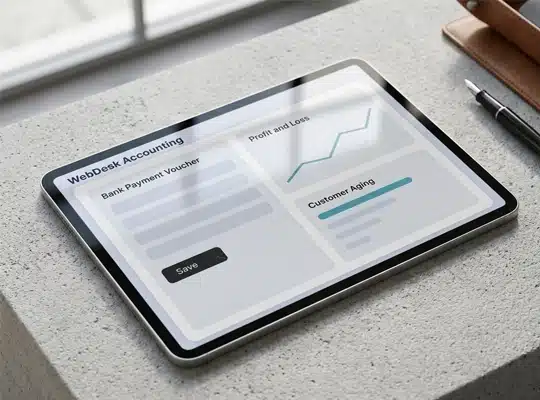
Record payment, receipt, journal and petty cash entries with structured reconciliation.

Clear Financial Analysis icon

Clear Financial Analysis

Review balances, expenses, budgets, stock values and payment information.

Financial Reporting for Better Visibility icon

Financial Reporting for Better Visibility

Reports on receivables, payables, profit, balances and business performance.

For Small Teams

Small Biz Accounting Software in UAE Without the Extra Complexity

Small teams need books they can keep up with every day. Owners looking for accounting software in UAE often outgrow the first tool they pick. WebDesk avoids that. You begin with the basics and add inventory or payroll when the business needs them.

ERP Accounting Software Small Business Owners Can Start With

Invoices and expenses and bank entries sit in one ledger. VAT and profit and balance reports are a click away so you never wait for month end to see where you stand.

  • Customer and supplier accounts in one place
  • Sales and purchase invoices with returns
  • Cash and bank vouchers with petty cash
  • Room to add more modules later

Additional Benefits That Come With the Best Accounting Packages in Dubai

Multi Currency and Cross Border Ready

Handle transactions in several currencies with organized currency records.

Audit Ready Financial Statements

Profit and Loss, Balance Sheet and Cash Flow from recorded entries, with transaction level records behind them.

ERP Integration

Connect accounting with Inventory, CRM, Trading, Payroll and POS.

Tax and Compliance Workflows

Maintain tax configuration and records to support VAT and other reporting.

Real Time Financial Information

Current receivables, payables, balances and cash flow for timely review.

Everything on One Balance Sheet

Flexible ledger, vouchers, audit trail, PDC tracking, multi branch consolidation and Web, Excel or PDF export.

Webdesk ERP 4.0 Accounting (Key Features)

  • Company Configuration
  • Business Unit
  • Designation
  • Dashboard Access
  • Terms and Conditions
  • Search Ref Document
  • Zone Master
  • Currency Setup
  • Countries
  • City Master
  • Email Configuration
  • State
  • Financial Year Master
  • Chart of Account
  • Currency Master
  • Bank Master
  • Tax and Discount Group
  • Tax and Discount Master
  • Cost Center
  • Account Reconciliation
  • Account Setup Form
  • Transaction Locking
  • Bank Payment Voucher
  • Cash Payment Voucher
  • Bank Receipt Voucher
  • Cash Receipt Voucher
  • Journal Voucher
  • Petty Cash Voucher
  • Inventory Expense
  • Brand Master
  • Category
  • Product Master
  • Product Unit
  • All Product List
  • Approval Flow
  • Approval Notification

Accounting Reports Your Team Can Use Every Day

Structured reports to review transactions, balances, expenses, receivables, payables and performance. The Expense Sheet helps teams that track expenses inside the same accounting system.

  • Profit / Loss Report
  • B/S Report
  • Trial Balance Report
  • Ledger Report
  • Customer Ledger New
  • Customer Ledger
  • Supplier Ledger
  • Customer Aging
  • Expense Sheet
  • Supplier Aging
  • Cost Center Sheet
  • Ageing Status Report
  • Post Dated Cheques
  • Cash Register Report
  • Account Ledger Report
  • Current Stock Report
  • Purchase Bill Report
  • Sales Bill Report
  • Stock With Value Report
  • Day Book
  • Cash Book
  • Bank Book
  • Purchase Register
  • Sales Register
  • Journal Register
  • Bank Payment Voucher Summary
  • Cash Payment Voucher Summary
  • Bank Receipt Voucher Summary
  • Cash Receipt Voucher Summary
  • Journal Voucher Summary
  • Petty Cash Voucher Summary
  • Bank Payment Voucher
  • Cash Payment Voucher
  • Bank Receipt Voucher
  • Cash Receipt Voucher
  • Journal Voucher
  • Petty Cash Voucher
  • Currency Master
  • Bank Master Report
  • Account Reconciliation Report
  • Chart of Account Master Report
  • Financial Year Master Report
  • Discount Tax Group Master Report
  • Discount Tax Master Report
  • Vendor Master Report
  • Designation Master Report
  • Relation Master Report
  • Loan Installment Master Report
  • Loan Master Report
  • VAT Input and Output Report
  • VAT Input and Output Report New
  • Item Wise VAT
  • Invoice Group Wise VAT
Module folios

Forms and reports, folio by folio

Explore each folio to see the entry forms and reports your team will use every day.

Folio 01

General Ledger Management

The General Ledger provides the foundation for organized accounting. Manage the Chart of Accounts, journal entries, payment and receipt vouchers, cash and bank transactions, opening balances and recurring accounting activities while maintaining a clear transaction history.

Forms

  • Chart of Accounts Setup
  • Journal Voucher Entry
  • Payment / Receipt Voucher
  • Cash / Bank Voucher
  • Contra and Recurring Voucher
  • Opening Balance Entry

Reports

  • Multi-Level Trial Balance
  • General and Subsidiary Ledger
  • Journal Voucher Register
  • Day Book
  • Chart of Accounts Report
  • Audit Trail Report
See General Ledger Management in a demo
Folio 02

Accounts Payable

Manage supplier accounts, purchase invoices and vendor payments through a structured accounts payable workflow. Track outstanding amounts and supplier balances to maintain better control over payment obligations.

Forms

  • Supplier / Vendor Master
  • Purchase Invoice Entry
  • Debit Note
  • Supplier Advance Payment
  • Supplier Payment Voucher
  • Supplier Credit Limit Setup

Reports

  • Supplier Aging Report
  • Accounts Payable Summary
  • Purchase Register
  • Supplier Ledger
  • Outstanding Payables
See Accounts Payable in a demo
Folio 03

Accounts Receivable

Track customer invoices, receipts and outstanding balances from one accounting workflow. Monitor customer accounts and ageing information to maintain visibility over receivables and collection activity.

Forms

  • Customer Master
  • Sales Invoice Entry
  • Credit Note
  • Customer Receipt Voucher
  • Customer Credit Limit Setup
  • Customer Advance Receipt

Reports

  • Customer Aging Report
  • Accounts Receivable Summary
  • Sales Register
  • Customer Ledger
  • Outstanding Receivables
See Accounts Receivable in a demo
Folio 04

Cash and Bank Management

Manage bank accounts, cheque transactions, petty cash and transfers from one place. Maintain organized bank records and monitor Post-Dated Cheques through dedicated accounting workflows.

Forms

  • Bank Account Master
  • Cheque Issuance
  • PDC Register
  • Bank Transfer
  • Petty Cash Voucher
  • Bank Reconciliation Entry

Reports

  • Bank Reconciliation Statement
  • Cash Book / Bank Book
  • PDC Status Report
  • Cheque Register
See Cash and Bank Management in a demo
Folio 05

Budgeting and Cost Control

Plan and monitor departmental, project and cost-centre spending. Compare planned budgets with actual transactions to identify variances and maintain better control over business expenditure.

Forms

  • Budget Entry (Annual / Periodic)
  • Budget Revision
  • Cost Center Master
  • Budget Approval Workflow

Reports

  • Budget vs Actual Variance
  • Cost Center-wise Expense
  • Departmental Budget Utilization
See Budgeting and Cost Control in a demo
Folio 06

Fixed Assets Management

Maintain asset records throughout their lifecycle, from registration and depreciation to transfers, maintenance and disposal.

Forms

  • Asset Registration
  • Depreciation Method Setup
  • Asset Transfer
  • Asset Disposal / Write-off
  • Asset Maintenance Log

Reports

  • Fixed Assets Register
  • Depreciation Schedule
  • Asset Movement Report
  • Asset Disposal Report
See Fixed Assets Management in a demo
Folio 07

Multi-Currency Management

Support accounting for businesses working with multiple currencies. Maintain currency records, exchange rates and revaluation information while organizing foreign-currency transactions within the accounting system.

Forms

  • Currency Master Setup
  • Daily Exchange Rate Update
  • Currency Revaluation

Reports

  • Multi-Currency Ledger
  • Foreign Exchange Gain/Loss
  • Currency Revaluation Report
See Multi-Currency Management in a demo
Folio 08

Taxation and Compliance

Maintain tax codes, rates, discounts and related transaction records within the accounting workflow. The system supports configured VAT and tax-related accounting processes for businesses operating in the UAE.

Forms

  • Tax Code / Rate Master
  • Withholding Tax Deduction
  • Sales Tax Invoice
  • WHT Certificate Generation

Reports

  • Withholding Tax Report
  • Sales Tax Summary
  • Tax Return Support Report
See Taxation and Compliance in a demo
Folio 09

Financial Reporting and MIS

Turn recorded accounting transactions into structured financial statements and management reports. Review business performance through Profit and Loss, Balance Sheet, Cash Flow and account-level reporting.

Forms

  • Financial Period Configuration
  • Report Template Designer
  • Consolidation Mapping

Reports

  • Profit and Loss Statement
  • Balance Sheet
  • Cash Flow Statement
  • Consolidated Financial Statements
  • Accounting-at-a-Glance Dashboard
See Financial Reporting and MIS in a demo
Folio 10

Job Costing / Cost Center Accounting

Track costs and profitability at project, job or cost-centre level. This helps businesses organize project expenditure, compare budgets with actual transactions and review financial performance by activity.

Forms

  • Job / Project Master
  • Job Cost Allocation
  • Job Budget vs Actual Setup

Reports

  • Job-wise Profitability Report
  • Job Cost Allocation Report
  • Job Center Transaction Summary
See Job Costing / Cost Center Accounting in a demo
Closing Balance

Everything on One Balance Sheet

  • Flexible General Ledger, Chart of Accounts and Sub-Accounts
  • Payment, Receipt, Cash, Bank and Custom Vouchers
  • Scheduled Transactions and One-Click Reversals
  • Complete Transaction Audit Trail
  • Job / Cost Centre-Based Journal Management
  • Bank Reconciliation with PDC Tracking
  • Multi-Currency Accounting
  • Advanced Reporting with Web, Excel and PDF Export
  • Flexible Financial Period Configuration
  • Multi-Branch Consolidation Accounting
FAQ

Accounting Software — frequently asked questions

01Can your accounting software integrate with existing systems?

Yes. WebDesk ERP is designed as a connected ERP environment and can work with related business modules such as inventory, CRM, trading, payroll and POS. Integration requirements can be reviewed according to the systems and workflows used by your business.

02Can I customize the dashboard for my business requirements?

The software includes dashboard access and configurable accounting workflows. Specific dashboard and reporting requirements can be discussed during the implementation process.

03What kind of support do you offer?

Support requirements can vary according to the business setup, modules and implementation scope. Contact ICT Information Systems LLC to discuss your accounting software requirements and the appropriate support arrangement.

04Is the software suitable for small businesses?

Yes. The accounting workflow covers core requirements such as customers, suppliers, invoices, payments, bookkeeping, expenses and financial reports, while the broader ERP structure can support businesses as their operations expand.

05Can the software support multiple branches and currencies?

The accounting system includes multi-currency functionality and supports multi-branch accounting workflows, allowing businesses to organize financial information across different operational locations.

Next steps

See WebDesk running on your business

Book a guided demo with an ERP consultant, or talk to our team right now.

Book a Free Demo

Personalised demo · Free requirement analysis · Proposal within 24 hours

Please enter your name
Please enter your company
Enter a valid email
Enter a valid phone number

Your details stay private. No spam, ever.

Thank you! Your request has been prepared — our team will contact you shortly.

Chat with sales

Instant answers on WhatsApp, Monday – Friday, 9:00 – 18:00 GST.

Chat now

Call us